Journey Mapping New Feature Notifications

Schwab understood that updating their mobile app regularly is essential to keeping their users engaged. It was therefore critical to understand and guide users through a seamless new product feature journey on any device. While also obtaining actionable data so Schwab knew how to improve their mobile apps.
THE PROBLEM
- Prior to releasing an app update, Schwab did not have a comprehensive plan in place to achieve it, measure it, and communicate it.
- There are different UX product owners that use different channels to communicate to users about new mobile feature updates.
- Schwab relied on automatic updates that eventually forced users to upgrade without utilizing a more proactive approach.
- Schwab was not growing its percentage of early adopters to decrease optimizing for earlier product versions.
THE SOLUTION
- Ask: What are the main features or improvements of your update? How will it benefit Schwab users or solve their problems? How will it affect existing users and their data or preferences?
- Create: Journey Map as a UX visualization document showcasing the steps that a user takes in a process to accomplish new feature utilization.
- Utilize: In-app guides to promote new feature and increase awareness of existing ones, to ensure users are engaging with the right features
- Build: Update reminders into the app itself, using consistent voice, tone & iconography
SOLUTION ROADMAP
A user journey is defined as a series of steps that represent how you want users to interact with your app. It involves the analysis of how users are interacting with the app to identify the weakest points in the path to conversion. And how to eliminate those weakest points.
I mapped all points at which the user came into contact with the app (not displayed due to confidential issues) when a new feature is launched. Making sure we highlighted an app’s functionality and why users will benefit from installing the app/new feature onto their device.
Step One: Utilize the Right In-App UX Pattern to Highlight New Feature
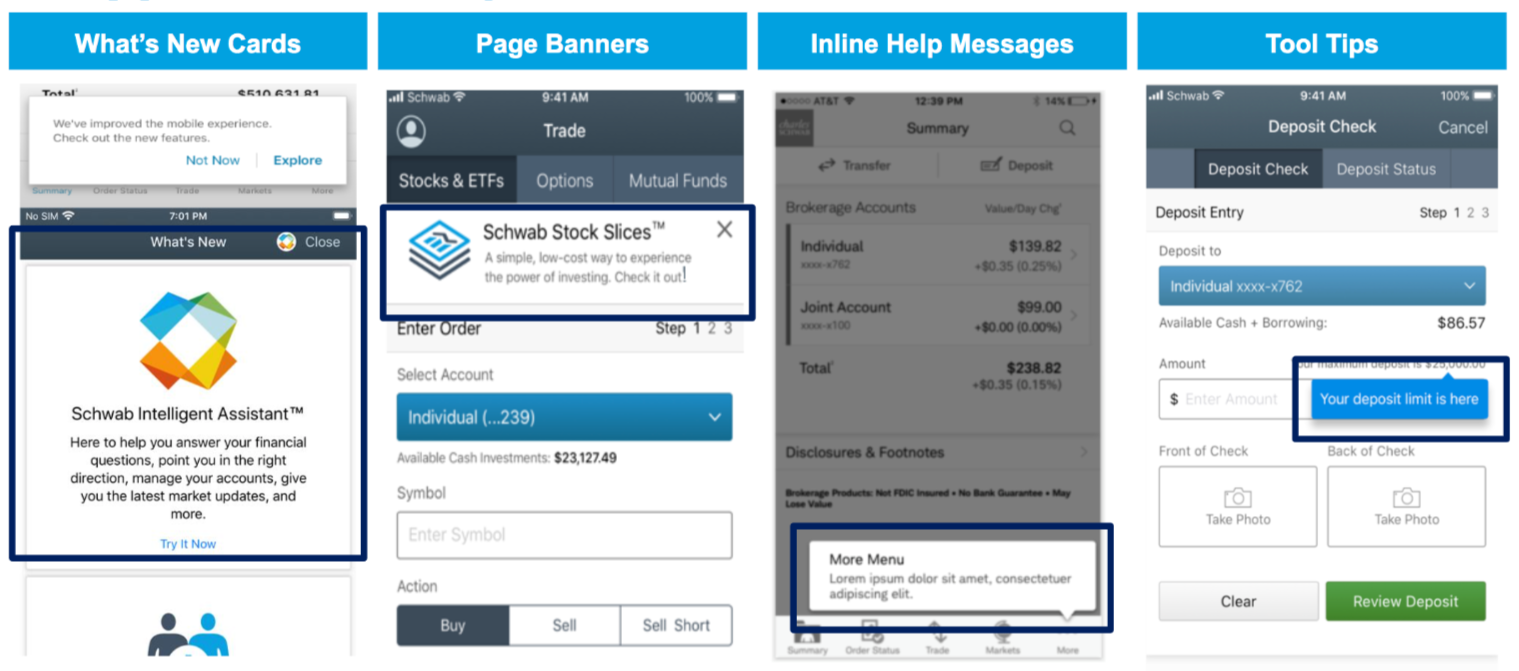
Modal, banners, inline messages and What’ New cards can be used to communicate product updates showcasing completely new features or a redesign besides their usual onboarding function. They can appear separately or in a series.
Recommended In-App Features:
- Modals should be utilized to draw attention to clear and simple messages, even in the case of inpatient users.
- Page Banners should provide a simple and informational message.
- “What’s new” card views should be utilized every time Schwab releases something new while the user is opening a screen. This card view can display views on top of each other, helping to give a rich feel and look to the UI design.
- Tooltips: Need to explain new features at that exact part of the app. Let people discover the product and give them small bits of information to try new things. This way people will see these in context, but only when needed.
Step Two: Share New Feature on All Platforms
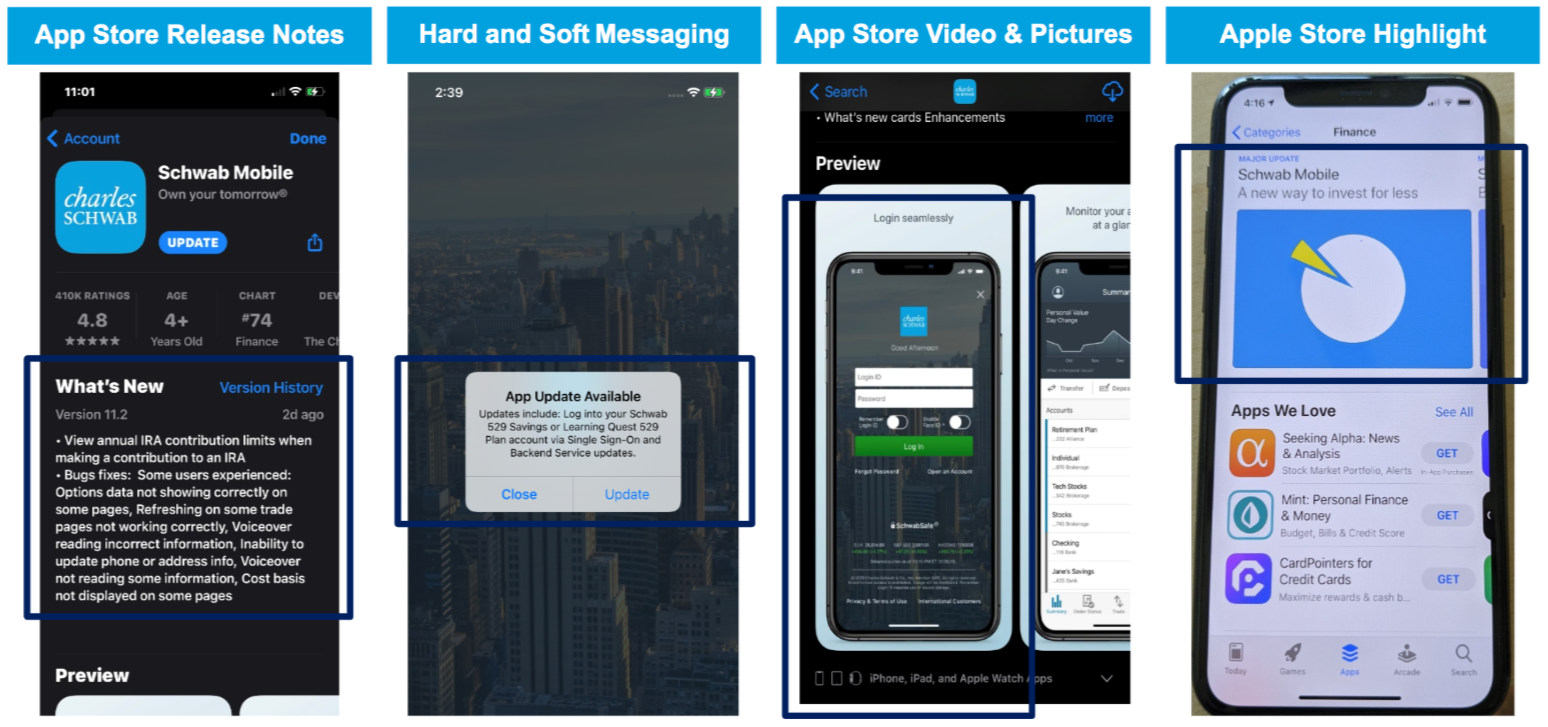
Utilizing App Store tool such as release notes, automatic update messages and walkthroughs are ideal to provide “tours” especially when changing many things on the app at once.
Recommended App Store Tools:
- Release Notes for app stores should always include product release notes. These text boxes create a window to a new world and although not many people read them, but those who do could represent your closest users.
- Automatic Updates should provide a simple and informational message.
- Video & Image Walkthrough use video and/or images to provide a guided tour through a product serve as the perfect “tour guide” when changing many things at once.
- App Store Highlights help shine a spotlight on developers doing great work. They highlight new apps, and new significant features. Schwab needs to identify factors used to guide the highlights selection process.
Step Three: Utilize Multi-Channels to Announce new Feature
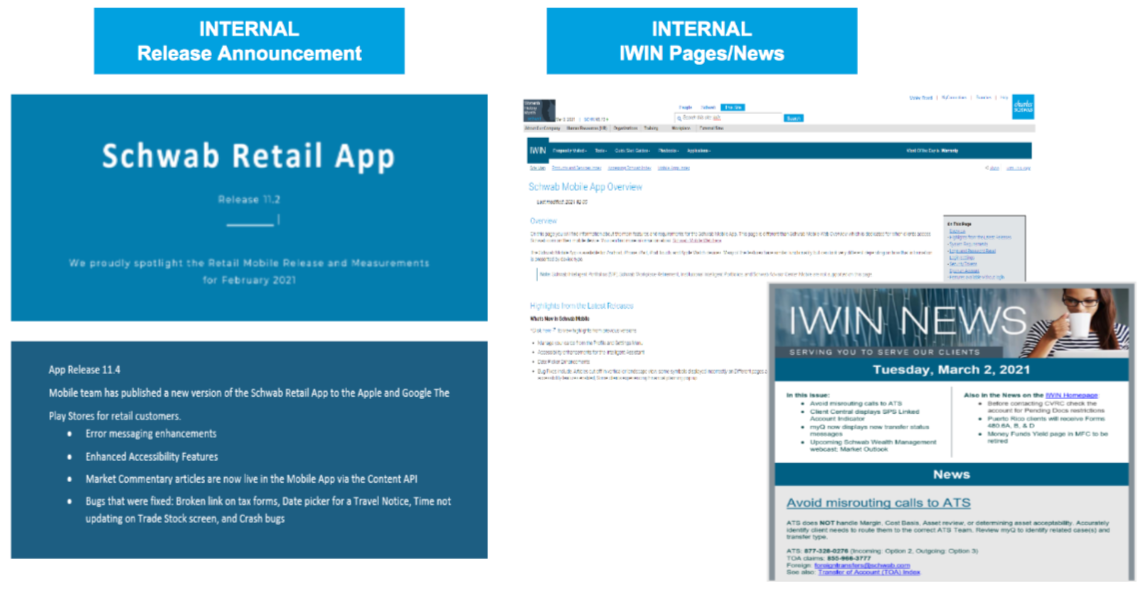
Recommended Communication Tools:
- Release Announcement for internal communications for your feature launch are designed to build anticipation and awareness. They can make or break the first impression of your new product.
- IWIN Page/News for current employee announcement should explain to employees the “what,” “why,” and “when” of the new app features. It should provide a detailed description of product features and use cases. You’ll want employees to have all the necessary information to promote the product to others.