Content Management Systems Defined

Humana was growing its content practice whereby it intended to create a full-stack practice of UX Writing, Content Strategy and Content Design. The first critical component was to get buy-in to a content management system with a UX Roadshow. The goal was to involve key stakeholders to obtain buy-in of the tools and features needed to make building and supporting content-driven applications quicker and easier.
THE PROBLEM
- Many stakeholders were not aware of the value of content management and what it was supposed to do.
- Humana was working with content design silos whereby most teams did not have full file sharing access, collaboration, or social features.
- The current system did not consolidate and organize content and its context in a standardized way adding time to UX design work when files couldn’t be located for easy use.
THE SOLUTION
- Go on a UX Roadshow to teach stakeholders, that were also decision makers on the value of a UX content management and it many benefits.
- Utilize a UX content management to automate business processes, track progress, and securely share information across departments (or even externally in later phases).
- Identify the tool that builds on a traditional database by providing common context features that web, mobile, and other software applications need to build new content solutions efficiently.
THE STRATEGY
Create presentation for UX Roadshow identifying in simple terms what a Content Management was, what its value proposition was and what key features should the Humana system have.
WHAT IS CONTENT MANAGEMENT?
- Similar to traditional “copy deck”, a content management system is a deliverable that acts as a source of truth and inventory on copy/text that exists within a digital design.
- Its documents and maps content to the final UI.
- With it Content Strategists & Content Designers plan for and reduce, reuse and rework content across all digital designs.
- Ideally the system will primarily be used by Content. Strategists, Designers and Developers but should also be reviewed by the Design and Product teams.
WHAT IS THE VALUE OF CONTENT MANAGEMENT?
- Serves as the source of truth for the copy/text within a design.
- Complies requirements in a single location to ensure consistency in tone and word usage.
- Gives stakeholders a chance to review copy/offer feedback before it’s implemented in designs.
- Allows teams to manage content across teams and sites.
- Content can be used during usability testing.
WHAT SHOULD CONTENT MANAGEMENT SYSTEMS INCLUDE?
- Target Product, Feature and PI/date information.
- Content Types (error messages, FAQs, alt text, etc.)
- Copy Placement (Header, footer, button, link)
- Page Title and URL structure
- Status (New or Updated to existing content)
- Relevant Feedback, Content Choices backed by Data or UX Tests
- Find copy to be implemented in Go Live
- Content Model Information (when applicable)
- Link to associated designs
WHAT SHOULDN'T THE CONTENT MANAGEMENT SYSTEM INCLUDE?
- Graphics, images or specific-visual aspects of the designs.
- Information that is not relevant to the specific product feature.
- Content that is in draft form. Only final copy should be included in the database.
PATH TO CONTENT MANAGEMENT
- Ideate: Review UX research and learnings and apply to content creation
- Model: Complete content modeling making sure to document all content types associated with the design and purpose of each piece of content
- Review: Final review of content with product, design, marketing, legal, compliance and clinical stakeholders
- Deliver: Handoff final content, related designs and content models to engineering and product
- QA: Review content in the testing environment for accuracy
- Upload: Share final content in word document form to the Content Database, creating new file that adheres to file creation protocols
- Share: Distribute new content database link to relevant stakeholders
- Content that is in draft form. Only final copy should be included in the database
THE STRATEGY IN SUMMARY
Determine through User Research core needs of CMS:
- To share the same piece of content to multiple channels at once
- To scale content while meeting all regulatory and legal review requirements
- To lessen design and development time with easy content access
Recommend CMS fitting Humana’s needs: SharePoint
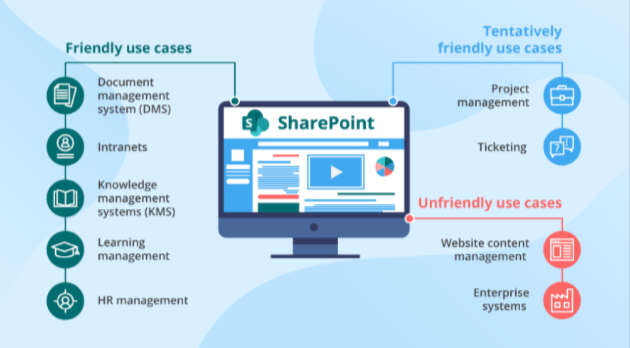
FINAL DELIVERABLE - ROADMAP TO A CMS
Below outlines the Roadmap to identifying, selecting and utilizing a Content Management System in a growth UX Design practice.
Define the Purpose and Goals
It’s essential to clearly understand what Humana hopes to achieve with its Content Management System (CMS), this will be the greatest influence on the choice of CMS and the implementation process. What problems does the Humana CMS need to solve for and what type of content will it be managing – think long-term not just today’s needs.
Evaluate and Choose a CMS

Many different CMS options are available; however it is important to know the budget and funding allocation for your CMS selection. CMS systems can range from basic to very complex. You want to be able to grow with your CMS. Large enterprises like Humana require more complex and customizable options like SharePoint. When evaluating CMS options, it’s essential to consider factors like the company’s size and complexity of the content to be managed, and the technical expertise required to implement and use the CMS.
Plan the Implementation
Once a CMS is chosen, the next step is to plan the implementation process. Planning the implementation process involves identifying the key stakeholders involved, setting clear goals and timelines, and identifying any potential roadblocks or challenges that may arise during the implementation process. Depending on the size and complexity of the project, it may be helpful to create a detailed project plan to ensure that all tasks are completed on time and within budget.
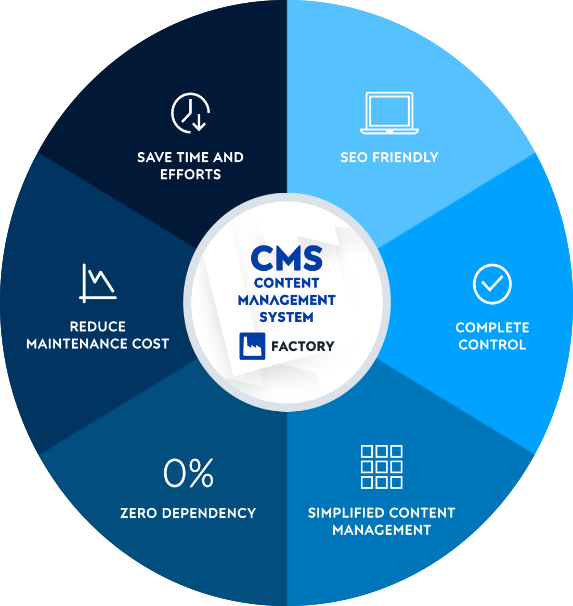
Configure and Customize the CMS
Once the CMS is chosen, it needs to be configured and customized to meet the company’s specific needs. This might include setting up user accounts, defining roles and permissions, customizing the look and feel of the interface, and creating custom templates or modules to support specific content types.
Migrate Existing Content
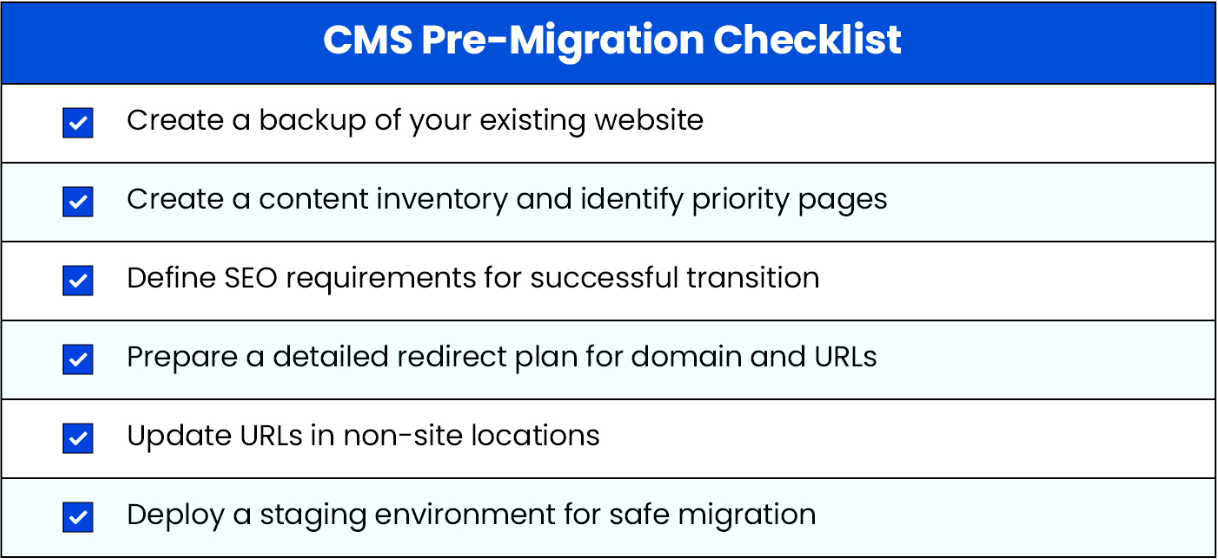
Many organizations have existing content located throughout their UX practice, that will need to be migrated to the new CMS. This involves exporting the content from the old system and importing it into the new CMS. Depending on the size and complexity of the content, this step can be time-consuming and require careful planning to ensure that the content is migrated correctly.
Train Users
Once the CMS is configured and customized, it’s crucial to provide training and support so users can effectively use the system. This might involve creating training materials like user guides or video tutorials, offering in-person or virtual training sessions, and providing ongoing support through a helpdesk or support forum.
Test and Launch
Before launching the CMS, it must be thoroughly tested to ensure it meets all of the company’s requirements and works correctly. This might involve conducting functional tests to ensure all features are working as expected load testing to ensure the CMS can handle high traffic, and security testing to identify and address any vulnerabilities.
Maintain and Update
Once the CMS is launched, it’s vital to maintain and update it regularly to ensure that it continues to meet the company’s needs. This might involve regular backups, monitoring performance and security, and updating the CMS with new features and functionality. It’s also important to periodically review and update the CMS implementation plan to align with the company’s changing goals and objectives.